
Context
All construction professionals know that today’s construction projects must not only be functional and economical, but also carbon neutral, circular, smart, inclusive, healthy and flexible. Construction clients, property owners and building users are increasingly demanding and have high and explicit expectations regarding the performance of the built environment.
To meet all these requirements, a systematic approach is mandatory. Gone are the days when you could manage project quality from a sheet of paper or a simple checklist. Fortunately, platforms such as BriefBuilder offer valuable help in organising and managing requirements in a unified way. For all project participants (i.e. architects, contractors, engineers), the result is a brief or digital file, online, with clearly stated requirements and verification rules. For example, with one click you can get an overview of all requirements for a given room type (e.g. offices), ranging from functional constraints (e.g. minimum usable floor space, number of office rooms) to indoor environmental conditions (e.g. acoustic and thermal comfort), adjacencies (required proximity between main functions) or items (furniture and equipment).
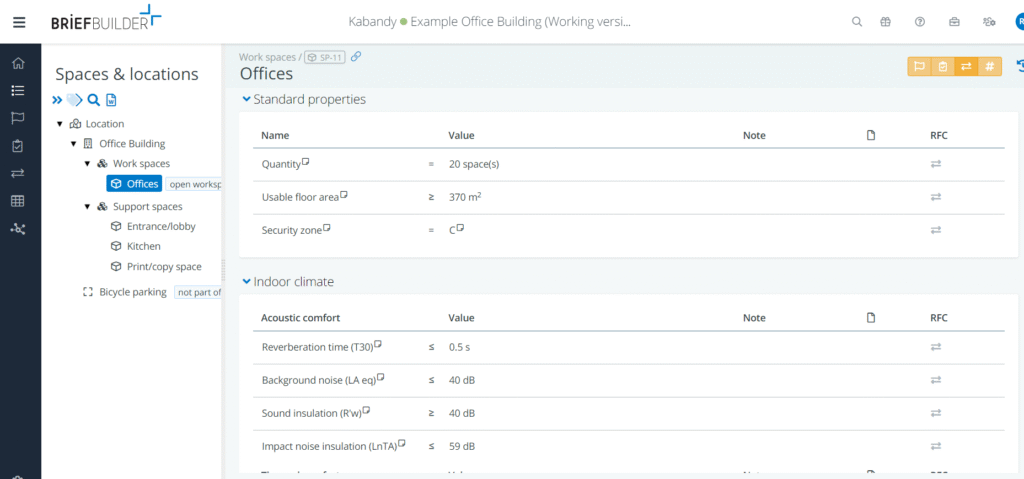
The challenge is to check whether the architectural design proposals meet all these requirements, especially for large projects where hundreds or even thousands of requirements may be involved. It is almost impossible to check them manually, which can lead to misunderstandings or conflicts later in the project. So the question is simple: how to quickly and reliably evaluate and compare architectural designs against the project brief?
Harnessing the power of BIM
To help us with this task, we can use the fact that more and more projects are being modelled using BIM (Building Information Modelling). Many still see BIM as a simple 3D representation of the building, but its scope goes beyond that: the building is conceived as an assembly of 3D objects, each with relevant and useful properties (e.g. material, manufacturer, price, acoustic properties, etc.). Since tools such as BriefBuilder also consider the building as a set of objects with properties to be checked, the connection between the two paradigms is obvious. Let’s explore how this can be achieved
BIM models are made by BIM experts using modelling software such as Autodesk Revit®, ArchiCAD® or BricsCAD®, but the practitioners who have to verify the file (e.g. client representatives, requirements managers, quality managers) often lack expertise in these tools. This is why BIM platforms like Kabandy have their place. Kabandy allows non-BIM experts to easily manage BIM models (with a focus on quantities), in order to obtain settlements, cost estimates, building inventories, etc., either interactively (via a BIM viewer) or automatically (as described in this article).
To this list of possibilities, Kabandy has now added compliance checking. Let’s get into the details of this process. We’ll start with a simple example and focus on constraints made on room types (offices, kitchens, print/copy spaces, etc.), including checking the exact number of rooms and the minimum usable area of the BIM model against the brief. To ensure correct correspondence between BriefBuilder and the BIM nomenclature, it is assumed that the Name of the spaces in BriefBuilder (‘Offices’, etc.) corresponds to the Type of spaces in the BIM model.
From requirements to rules
The workflow is a two-step process: first, exporting the brief from BriefBuilder to Excel; then importing it into Kabandy, along with an IFC file of the BIM model to be checked. This way we have both as-designed and as-built information in the Kabandy workspace.
The BriefBuilder Excel file will serve as the template for the compliance check, to identify the rules to be checked (in this example: on the number and areas of parts per type).
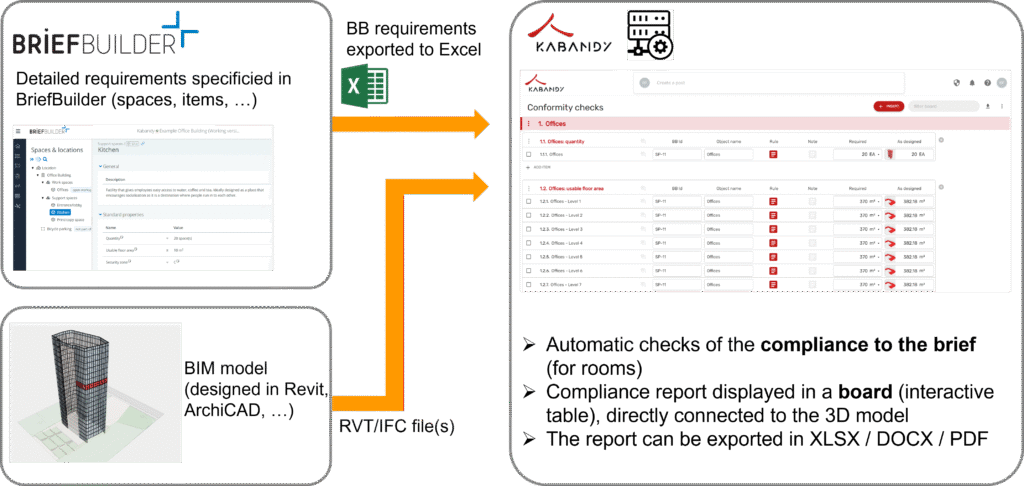
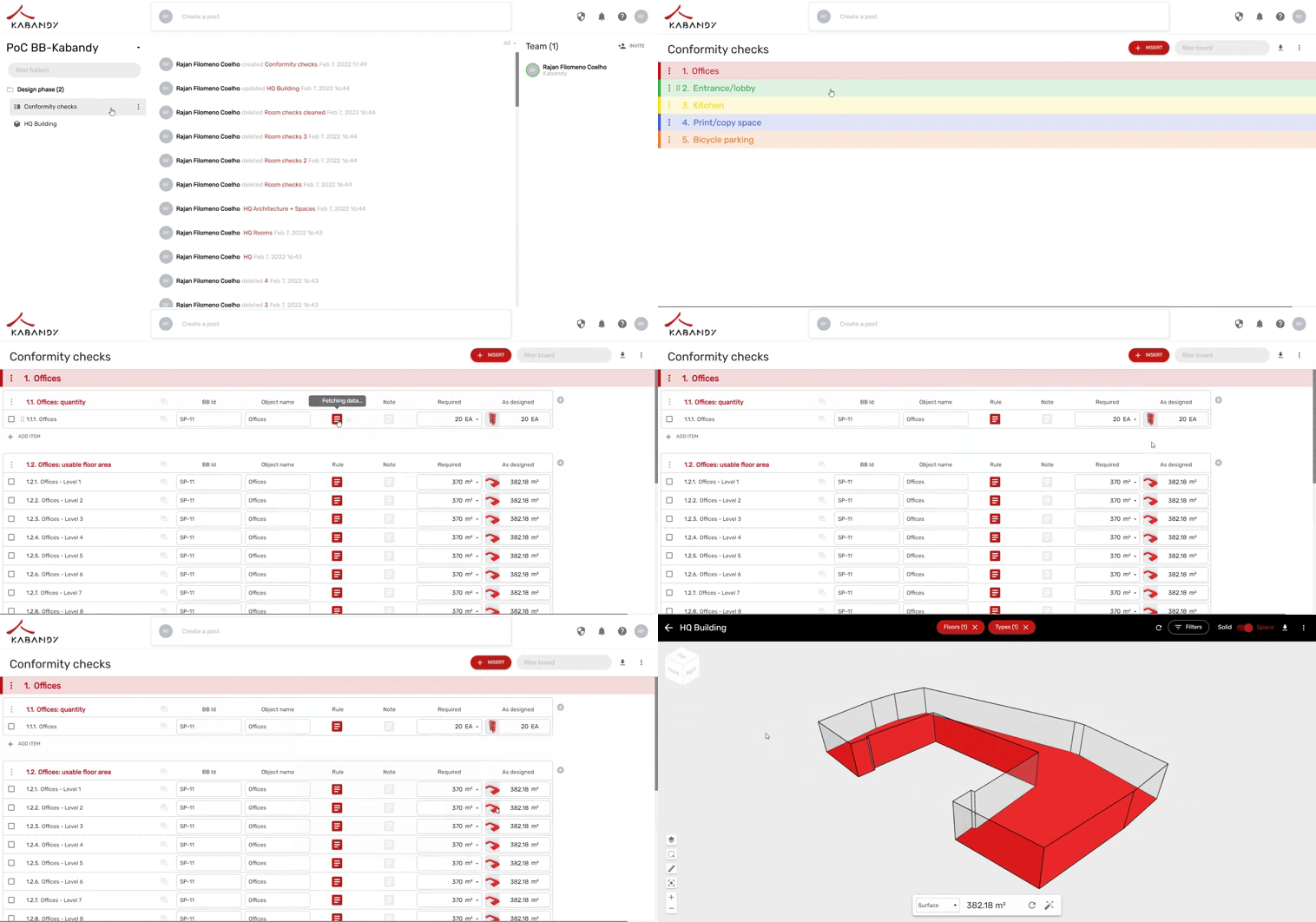
Kabandy automatically transforms this Excel into a board or dynamic table that contains the list of checks on all part types, as illustrated below. With very limited assumptions on the BIM model definition, compliance is assessed automatically – regardless of the size and complexity of the model.
In addition, an extra (magical!) option is available: automatic updating of compliance checks when the BIM model is updated. As shown below, the last column contains the same checks as the previous one, but has been generated automatically by duplicating and updating the column after loading a new version of the BIM model. This allows us to quickly observe how successive architectural designs evolve in the right direction.
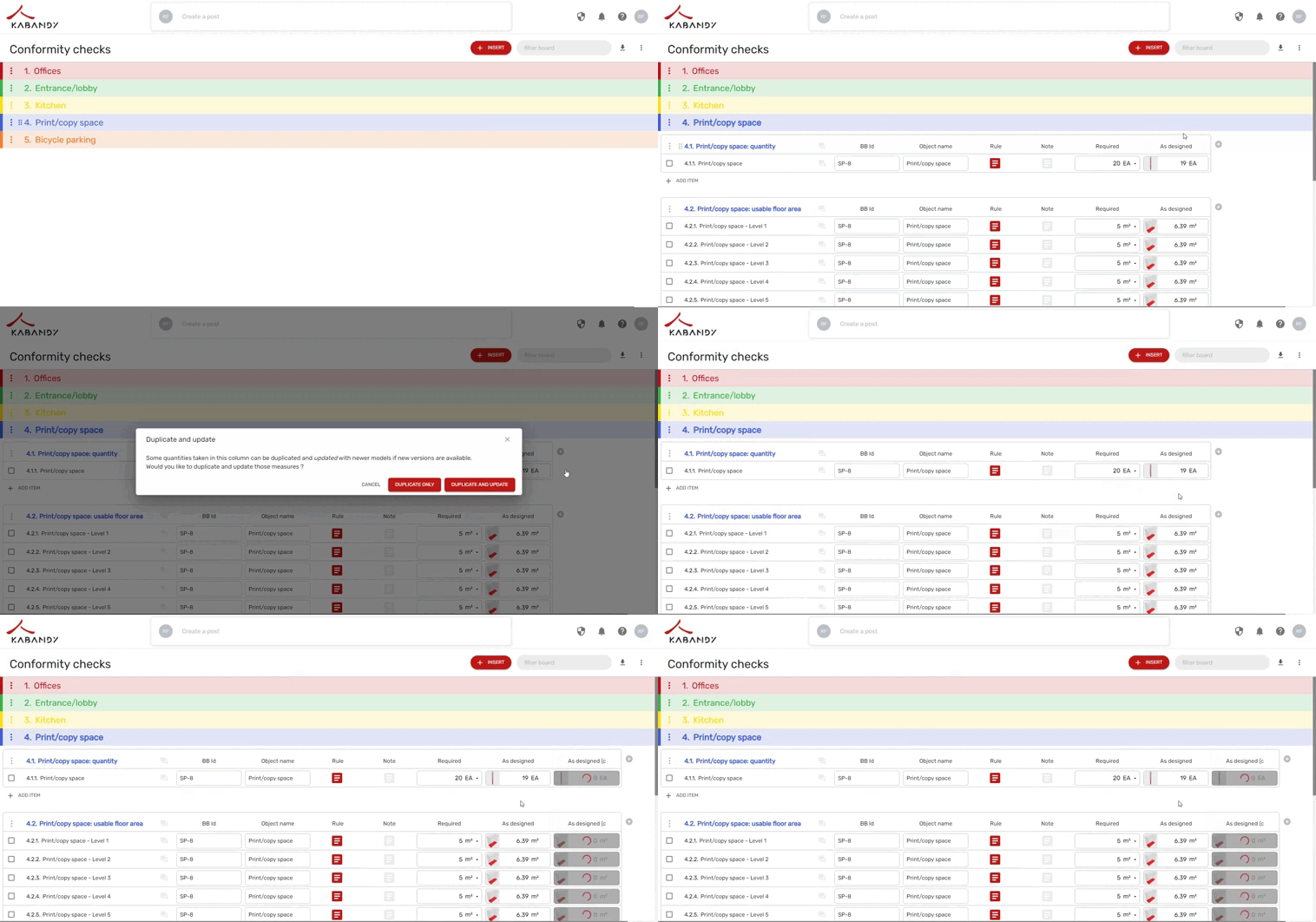
In this way, the architect – or the client’s project team – can quickly and easily check whether the new design proposals match the requirements of the needs programming. It is easy to imagine this type of check being carried out at the end of each stage of the design. This is a step towards a more systematic and integrated process of quality control against the customer’s needs. The same functionality also makes it easy to compare design variants. It is conceivable that the design team is testing different ideas and you would like to check how well these conform to the requested architectural programme. Similarly, a construction client may want to quickly compare different proposals in a competition or tender where several design teams are proposing different solutions.
Next steps
The above is obviously just an example. Compliance checking is not just about comparing square metres and amounts of space. It is also about checking the requirements on issues such as energy performance, construction costs, logistical organisation of the building, security, etc. However, it is a first step towards a more systematic approach to quality control in the design and construction sector
As we have shown in this article, the Kabandy platform can help construction professionals perform compliance checks with just a few clicks, providing a robust yet flexible workflow during the design and engineering processes. Although currently limited to a few checks (related to part types), we have demonstrated the feasibility of automated compliance checks, which paves the way for exciting functionality in the very near future!
Are you interested in a trial? Want to know more? Email us at hello@kabandy.com or info@briefbuilder.com.