
Quality assurance in BIM
Quality assurance is a crucial aspect in construction. There are many areas in which errors are found; digital models are one of them. Smart professionals know that the quality of models is often uncertain and that the information is not completely reliable. Good quality greatly improves project control and profitability, but poor quality is at best a waste of time and at worst another source of error. Implementing a quality assurance strategy on models is therefore essential to increase the chances of delivering the expected benefits to the client and their team.
At the beginning of a project, the verification process is often random and manual: when an inconsistency is discovered by the BIM manager, a problem is often added locally (somewhere on his computer…). It is then emailed or published online on an issue management platform (e.g. BIMcollab® or BIM Track®) and followed up until it is resolved. This way of working allows a quick start (requiring almost no preparation) but becomes inefficient in the long run. If the process takes half a day at the beginning, it quickly takes 5 to 10 days later in the project (to see this, just imagine checking 20 to 30 properties with specific rules on 1 million elements). Moreover, adding new checks throughout the process discourages team members who postpone efforts to the end of the project. The result is a model that may never be fully completed
In what follows, we’ll look at how modern software platforms like Kabandy can streamline this complex process through standardisation and automation.
Structuring the inspection process
Models produced using Revit®, ArchiCAD® or BricsCAD® can be checked against specifications using Kabandy to structure the process and reduce the time team members spend managing the quality of their models.
On the platform, checklist creation is done using online collaborative tables. The user interface is designed for non-experts and for flexibility as there is no single approach to the content of the checklist. It depends on the intended uses of the model at different phases:
- in the early design phases, quality checks are mainly related to modelling problems (elements belonging to another discipline file, modelled with the wrong category, or assigned to another level, etc.);
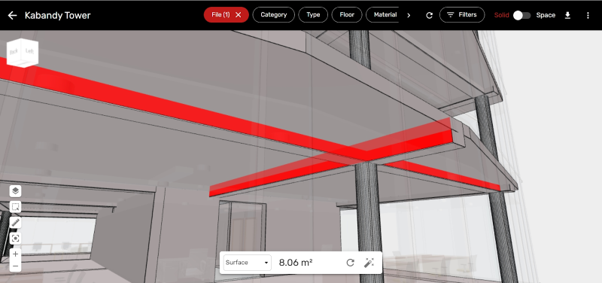
- as the tender phase approaches, additional checks ensure that the model is reliable for quantification (duplicated or missing elements, non-continuous finishes on several rooms, wall facades not separated by levels, dilemma of formwork of beams nested in slabs as shown in Figure 1, classification codes for easy retrieval of quantities, etc.);
- in end of execution, as the handover of keys approaches, the ‘as-constructed’ model is also checked to be ready for operations where information is king (QR codes, warranty date, product name, maintenance cases, numbering and location of parts, etc.);
- during the building operation, the model is checked to ensure that it remains up to date following changes (door moved, equipment renewed, furniture and staff moved, etc.).
How to (quickly) adapt the models to their needs?
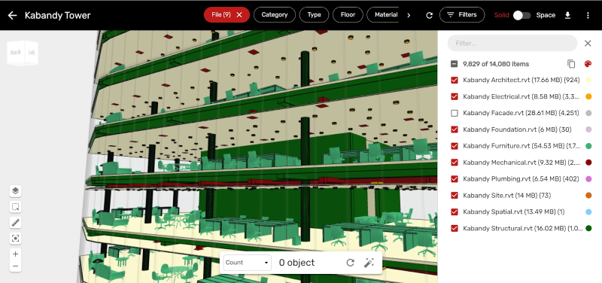
Once the checklist is established, the question of how to perform quality control on the entire model arises. To begin with, non-BIM expert users can use the intuitive viewer to quickly analyse their models. They can isolate features by combining filters and applying colours to view the data on the 3D model (see Figure 2). This way of working is well suited to the early stages of design, when team members need quick feedback on the quality of a model.
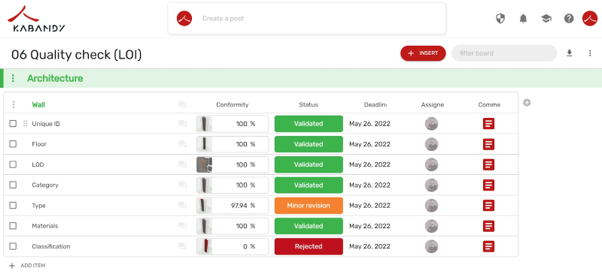
As the project progresses, the complexity of the model increases. It therefore becomes essential to automate the process using predefined rules. Kabandy allows users to configure geometric operators and regular expressions to perform quality checks (e.g. naming convention of classification codes or correct definition of object parameters). These rules are typically written by the BIM Manager in a ‘rules template’ that can be used by all to automate the generation of compliance reports for their models. The automation includes creating the viewpoint, the compliance score for each checkpoint, editing notes and assigning a status. The report is then shared in an online workspace for follow-up until the issues are resolved (see Figure 3)
Expected benefits
The addition of automation and standardisation brings significant benefits:
- Broader coverage: quality checks are performed on all objects in the model, as opposed to a subset of them when the checks are manual;
- Reduced human effort: when checks become repetitive, compliance reports are produced in a few clicks versus several days when checks are manual.
In addition, by structuring the process and communicating with a visual and intuitive solution, the BIM Manager demonstrates leadership and enables seamless communication within the team. It also speeds up the integration of new members. In particular, the modellers are clearly informed of the points of attention and steer the production in the right direction
In addition, this efficient and transparent process allows regular monitoring and use of the model from the design phase (area table, cost estimates, etc.), through the execution phase (work progress, material orders, schedule optimisation, etc.) to the operation phase (preparation of maintenance and cleaning contracts, inventory for legal obligations, space optimisation, etc.).
Of course, it is always a trade-off between the benefit and the effort required. Unlike other industries, the unique nature of buildings does not allow for full standardisation and automation. That is why at Kabandy we have put flexibility at the centre of our solution to adapt to the needs of the project. We are continually adding more automation to increase efficiency on complex cases. Exciting new features are coming in the very near future, so stay informed!